

Business phone systems & VoIP
Business phone systems that work wherever you do.
Cloud VoIP phone systems for businesses in Bolton, Manchester and across the North West. Desk phones, mobile apps and Microsoft Teams on one system, with your existing numbers and a local team looking after it.
- Keep your numbers
- Ready for the 2027 switch-off
- Set up & supported by us
Authorised partners
 Authorised BT partnerBroadband, lines & connectivity
- Authorised EE partnerBusiness mobile on EE
- Microsoft 365Licences, set-up & support
- UK-based supportLocal team in Horwich, Bolton
What is a cloud phone system?
One business number. Every device. No phone line.
A cloud phone system (also called hosted VoIP) runs your business calls over the internet instead of an old copper phone line.
Your team answers the company number on a desk phone, a mobile app, a laptop or inside Microsoft Teams. Calls follow your people rather than sitting on a desk, and changes that used to need an engineer, like a new starter, a holiday message or a new opening time, take minutes.
We supply, set up and support business phone systems for companies of every size, from a two-person office in Horwich to multi-site teams across Manchester, Bolton and the wider North West. Because the system is in the cloud, it works the same whether your staff are in the office, at home or on the road.
Built for the end of the analogue network
The UK's old analogue phone network is being switched off. A cloud phone system needs nothing more than a decent internet connection, so moving now takes the deadline off your list for good.
What you get with Infinity Comms
- Your existing numbers kept, moved across on a date that suits you
- Call flows designed with you: menus, ring groups, opening hours and holiday messages
- Apps for every device: Windows, Mac, iPhone, Android and the browser
- Microsoft Teams integration, so calls ring where your team already works
- Handsets pre-configured and delivered ready to plug in
- Training and ongoing support from our team in Horwich, Bolton
The PSTN switch-off
The analogue phone network closes on 31 January 2027.
Openreach has said there will be no extension. In July 2026 around 350,000 business premises were still on old copper phone lines, and business lines don't get the temporary safety net that home lines do. Phones, alarms, card machines, door entry and lift lines can all be affected.
Not sure what's still on a copper line? We'll check every line and device with you and move them across before the deadline.
Source: ISPreview, July 2026, quoting Openreach.
Features
Everything a modern phone system should do.
All the features are included in the setup we design for you. You use what you need and leave the rest switched off.
-
Apps on every device
Answer and make calls on the business number from a laptop, an iPhone, an Android or a browser. Personal mobile numbers stay private.
-
Microsoft Teams calling
Make and take external calls inside Microsoft Teams, so your team can live in one app all day.
-
Menus, queues & ring groups
Press 1 for sales, 2 for support. Calls queue politely, ring the right people and fall back to someone who's free.
-
Opening hours routing
Calls follow your opening times, bank holidays and lunch cover automatically, with the right message out of hours.
-
Call recording
Record calls for training, quality and disputes, stored securely in the cloud and easy to find later.
-
Wallboards & reports
See calls waiting, missed calls and answer times live, and spot busy periods before they become complaints.
-
CRM integration
Customer records pop up when they call, and calls log themselves in systems such as Salesforce, HubSpot, Pipedrive and Zoho.
-
AI transcripts & summaries
Turn calls and voicemails into text and short summaries, so nobody has to scribble notes mid-conversation.
-
Voicemail to email
Voicemails arrive in your inbox as audio files, so messages are never stuck on a desk phone.
See it in action
Follow a customer's call through your new system.
Pick a step to see what happens. Everything here is set up for you, in plain English, before you go live.
A professional welcome, every time.
Callers hear your own greeting and a short menu. During busy periods they hear their place in the queue instead of an endless ring.
- Recorded greetings and menus in your own words
- Different messages for out of hours and holidays
- Music or messages while callers wait
Straight to someone who can help.
The call rings the right group, in the order you choose. If nobody's free it moves on, rather than ringing out.
- Ring everyone, in turn, or the longest-free person first
- Overflow to another team or a mobile
- Supervisors can listen in, whisper or barge in for training
Picked up on a mobile at a customer's site.
Your engineer answers on the mobile app and the customer sees your business number, not a personal mobile. Transfer back to the office in two taps.
- Business number on mobile and laptop apps
- Presence shows who's free, busy or on a call
- Works over WiFi, 4G and 5G
Nothing gets lost after you hang up.
The call is logged, recorded if you choose, and attached to the customer's record in your CRM, with an optional AI summary.
- Call recordings stored securely in the cloud
- Call logged against the customer in your CRM
- Reports on missed calls and answer times
Your set-up
Choose how your team takes calls.
Most businesses mix and match. Office staff might use desk phones while field staff use the mobile app.
-
Desk phones
Familiar handsets for office desks and reception.
- Set up
- Pre-configured
- Power
- Over the network cable
- Best for
- Reception & office
Good forReception desks, sales teams and anyone who lives on the phone.
-
Most flexible
Mobile & desktop apps
The business number on the devices your team already has.
- Devices
- iOS, Android, Windows, Mac
- Hardware
- None needed
- Best for
- Hybrid & field teams
Good forHybrid workers, engineers and directors who are rarely at a desk.
-
Microsoft Teams
Call customers from the app your team already uses.
- Works in
- Teams desktop & mobile
- Numbers
- Your existing ones
- Best for
- Microsoft 365 users
Good forBusinesses already running on Microsoft 365.
-
Call centre features
Queues, wallboards and reporting for busy teams.
- Queues
- With callback options
- Live view
- Wallboards
- Best for
- Sales & service desks
Good forCustomer service, sales and support teams handling high call volumes.
Switching to us
Moving phone systems is easier than you think.
We do the heavy lifting. Most customers only notice the new system when it's already working.
Free review
We look at your current lines, numbers, contract end dates and anything else on a copper line, like alarms and card machines.
Design
We map out your call flows with you: who answers what, opening hours, menus, greetings and voicemail.
Install & move numbers
Handsets and apps are set up before go-live. Your numbers move across on an agreed date, with short training for your team.
Ongoing support
New starters, changes and questions go to one local team. No call centres and no ticket queues in another time zone.
What customers say
Local businesses, looked after properly.
-

“Infinity Comms are good guys to work with, that’s the thing I like about them.”
 Cliff BarryDyno Plumbing
 -

“It was a major upgrade to what we used to have — we can take calls remotely from outside the office.”
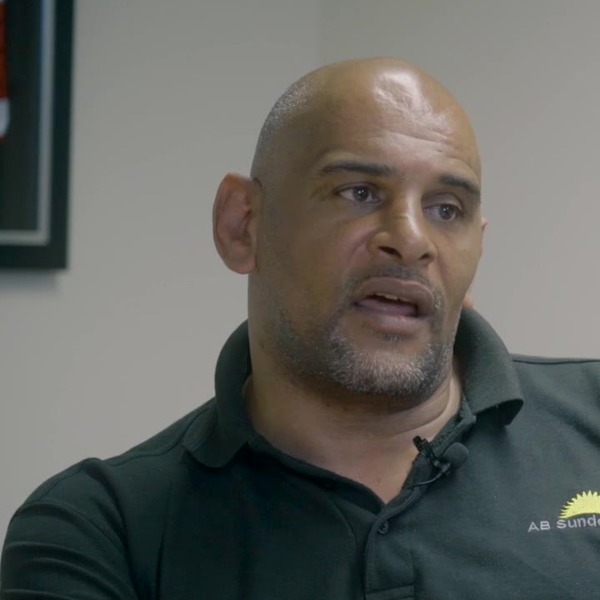 Sean RichardsonAB Sundecks
 -

“Their customer service is outstanding… I’d definitely recommend them to anybody.”
 Lisa BradyPerfect Recruitment
FAQs
Business phone system questions.
Can't see your question? Ask us. A real person will answer.
Can I keep my existing business phone numbers?
In almost every case, yes. We move (port) your existing numbers to the new system so customers keep calling the numbers they know. We agree the date with you and keep the old service running until the move is complete.
What is VoIP, in plain English?
VoIP stands for Voice over Internet Protocol. It simply means your phone calls travel over the internet instead of an old copper phone line. A cloud phone system is VoIP that's hosted for you, so there's no phone system box in a cupboard to maintain.
How much internet speed do I need for a VoIP phone system?
Less than most people think. A single call uses roughly 100kbps in each direction, so ten calls at once needs about 1Mbps up and down. What matters more is a stable connection. We check your broadband before we quote and can supply business broadband or a leased line if it needs improving.
What happens to calls if the internet goes down?
Calls can divert automatically to mobiles or another site, so customers still get through. Staff can keep working on the mobile app over 4G or 5G. For extra resilience we can add a 4G/5G backup connection to your broadband.
Does it work with Microsoft Teams?
Yes. Your team can make and take external calls on your business numbers inside Microsoft Teams. We also supply and set up Microsoft 365 if you need it.
What does the PSTN switch-off mean for my business?
The analogue phone network (PSTN) is due to close on 31 January 2027, and business lines won't get a temporary safety net. Phones on old lines need to move to VoIP, and devices like alarms, card machines and lift lines need checking. We'll audit every line with you and move everything across in good time.
Can we record calls?
Yes. Call recording can be switched on for everyone, for certain teams or on demand. Recordings are stored securely in the cloud. You'll need to tell callers that calls may be recorded, and we'll add that to your greeting.
Can you support multiple sites?
Yes. All your sites can share one phone system, so a call to any branch can be answered or transferred anywhere, with free internal calls between sites.
Get a quote
Talk to a real person about it.
Tell us a little about your business and we’ll come back with straight answers, a clear recommendation and a quote in plain English.
What happens next
- We check what’s available at your address and look at what you have now.
- We recommend what fits, even when it’s the cheaper option.
- You get one clear quote. No pressure and no jargon.
Thanks, that’s with us.
We’ll be in touch on the next working day. If it’s urgent, call 01204 284000.
One supplier for all of it
Everything your business needs to stay connected.
- Business phone systemsCloud VoIP for desk, mobile and laptop
- Business broadbandFibre, full fibre and static IPs
- Leased linesDedicated, symmetrical, SLA-backed
- Business WiFiManaged TP-Link Omada networks
- WiFi surveysHeatmaps and access point plans
- Business mobileEE plans with hardware funds
- IoT SIM cardsMulti-network data for devices
- Remote workingPhones, Microsoft 365 and home connectivity
Areas we cover
Based in Horwich, Bolton, we look after businesses across Greater Manchester, Lancashire, Cheshire and the wider North West, and support customers throughout the UK.
Let's sort
your comms.
Phones, broadband, WiFi, mobile or something you're not quite sure about. Tell us what you need and we'll help you work it out.
- Authorised BT & EE partner
- UK-based support
- One supplier
- Support after installation